On the $20 Claude Pro and ChatGPT Plus plans, the 5-hour window starts with your first message. UsageForge sends that message for you, at 6:00 or the minute the last window resets, so a fresh window is already running when you sit down.
The cap isn't the problem. The clock is. Start at nine, run dry by 10:40, and you wait until two. Open the window at six instead and it resets at eleven, while you're still at your desk. One small message, sent before you wake up, moves your resets into your working hours.
Control panel
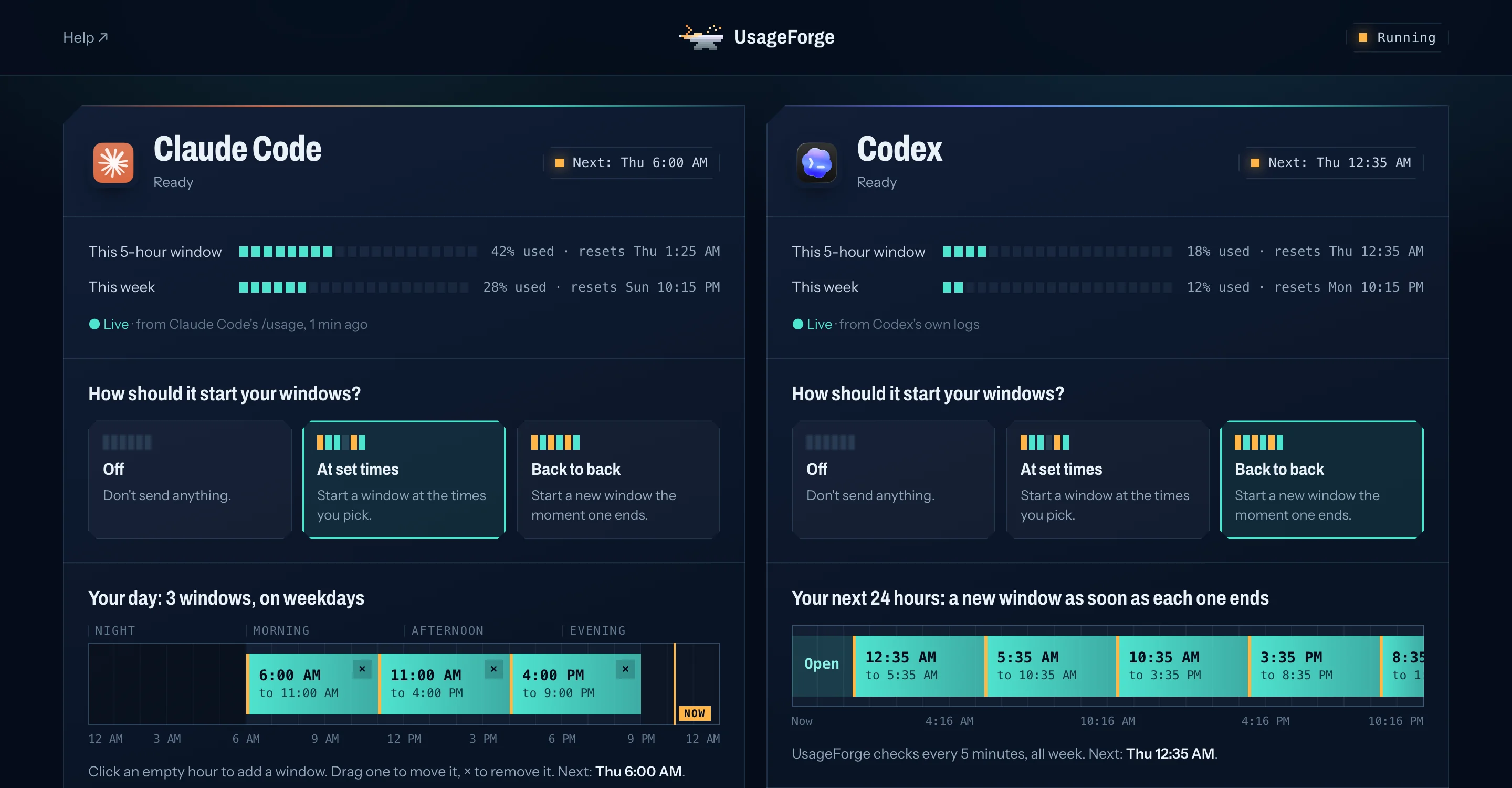
Click your day. That's the setup.
One page on your own computer. Pick times on a timeline, see live usage for Claude Code and Codex, and send a test message. After installing, you never need the terminal.
Click an hour to add a window
Drag to move, × to remove
Live 5-hour and weekly usage
Notifies you only when it matters
Modes
Two modes. One quiet ping.
Pick fixed times, or let it chain windows back to back. Either way it runs quietly on your computer, using the login you already have.
01
Mode 1
Your times / your days
At set times
Click the hours you want on the timeline. UsageForge sends one tiny message at each, so a window opened at 6:00 resets at 11:00, mid-morning instead of after lunch. Each time goes out on time, even while a window is open, so your day never drifts.
Starts the next window the minute the last one ends, all week. It checks every five minutes using Claude Code's own /usage and Codex's own logs, so checking costs nothing.
UsageForge runs the official claude and codex programs you already use. It never copies, exports or uploads a token. It runs quietly in the background and only notifies you when something needs you.
$ usageforge doctor
UsageForge 3.8.9
Claude Code (mode: schedule)
  ✓ signed in
  ✓ the background job can find it
Codex (mode: watch)
  ✓ signed in
Background check
  ✓ on, every 5 minutes
All good.
Setup
Set it up once.
Three steps, no terminal knowledge needed after the first.
01
Install
One Homebrew command. Needs Claude Code or Codex, signed in.
brew install kenny2077/tap/usageforge
02
Pick your times
Click the hours on the timeline, or let it run back to back.
usageforge ui
03
Forget it
It runs in the background and tells you if something needs you.
usageforge doctor
FAQ
Questions.
Does this give me more usage?
No. Your caps stay the same. UsageForge changes when each 5-hour window starts, so a reset lands while you're working instead of while you're asleep.
How much quota does a ping use?
Very little. Claude gets one short Haiku message with tools, hooks, plugins and MCP servers turned off. Codex gets one read-only codex exec at low reasoning effort. Back to back sends about 4–5 messages a day per tool, and each one counts a little toward your weekly cap.
Is it safe for my account?
UsageForge uses the official programs, your own login, on your own machine. It never extracts a token or shares an account, and it sends a few tiny messages a day with random timing. We found no report of anyone banned for scheduled pings. Anthropic's and OpenAI's terms leave automation a grey area, though, so read them and decide for yourself. Schedule mode is the most conservative choice.
Does my computer need to be awake?
Yes. A sleeping laptop can't send anything. On macOS, launchd runs a missed ping as soon as the Mac wakes. To wake it on a schedule, run sudo pmset repeat wakeorpoweron MTWRFSU 05:58:00.
Do I need to keep the control panel open?
No. Closing the page changes nothing. A background check that's built into macOS runs every 5 minutes, even after a restart, and notifies you if something goes wrong.
Where do the usage numbers come from?
For Claude Code, from its own /usage command. It runs on your computer and sends no message. For Codex, from the log files Codex already writes. Neither costs any quota.
What happens when I hit a limit?
UsageForge sees the reset time and waits until then. It doesn't send messages that can't succeed, and it sends you one notification.
How do I remove it?
Set both tools to Off in the panel, or run usageforge stop. Then brew uninstall usageforge and delete ~/.local/state/usageforge.